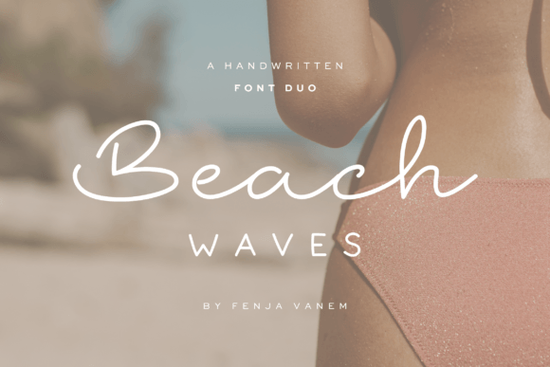
If you need a clean, coastal typeface that feels both relaxed and polished, the Beach Waves Duo Font gives you exactly that. It pairs a fluid handwritten script with a gentle sans serif, making it easy to create summer branding, wedding stationery, or print-on-demand products without spending hours searching for matching letters. Designers and small business owners often struggle to find fonts that balance personality with readability, but this duo handles that balance right out of the box.
What makes this coastal font pair work so well together?
The strength of this set comes from how the two typefaces complement each other. Tidelines is the script half, built with smooth, flowing strokes that mimic a pen moving across paper. It carries that relaxed, handwritten warmth without looking messy or hard to read. On the other side, Seawashed provides a clean sans serif foundation. It includes both regular and bold weights, plus multilingual characters, so you can type names, locations, or short phrases in several languages without breaking the visual rhythm.
When you place them side by side, the contrast does the heavy lifting. The script draws attention to headlines or names, while the sans serif keeps body text, dates, and details crisp. This is the same pairing logic you will find in other popular sets, like the playful lettering combinations that crafters use for seasonal products. You get visual interest without clutter.
Where can you actually use a beach-themed font duo?
Coastal typography is not limited to summer shops or seaside weddings. The relaxed elegance works across dozens of everyday projects. Here are a few places where this pairing fits naturally:
- Print-on-demand apparel and tote bags: Short quotes or location names look great when the script handles the main phrase and the sans serif grounds the smaller text.
- Small business branding: Boutique labels, candle packaging, and skincare tags benefit from the soft, handcrafted feel without sacrificing professionalism.
- Event stationery: Save-the-dates, menus, and welcome signs read clearly while keeping a light, airy mood.
- Social graphics and thumbnails: The bold weight of the sans serif keeps text readable on mobile screens, especially when paired with a simple background.
If you regularly create content for Instagram or Pinterest, you might also want to keep a social-ready script collection on hand for quick template swaps. Having a few reliable font pairs saved in your design folder cuts down production time significantly.
How do you install and pair these fonts without design experience?
You do not need advanced software to make this duo look good. Most design platforms, including Canva, Cricut Design Space, and Silhouette Studio, support standard OTF and TTF files. After downloading, simply install the fonts to your system, restart your design app, and they will appear in your type menu. If you work with larger libraries, a handwritten typeface bundle can help you stay organized, but you only need these two files to get started.
Pairing them correctly comes down to three quick rules:
- Keep the script for headlines or short phrases. Long paragraphs in any handwritten style become hard to scan.
- Use the regular sans serif for supporting text and switch to bold only when you need emphasis or contrast against a busy background.
- Give the letters room to breathe. Coastal designs rely on white space, so increase your line height slightly and avoid crowding the edges of your canvas.
For crafters who cut vinyl or heat transfer material, the clean curves in Tidelines weed smoothly, while the straightforward shapes in Seawashed cut cleanly on standard settings. If you prefer working with pre-made layouts, you can also explore a notebook-style handwriting set for journal covers or planner inserts that match this relaxed aesthetic.
What should you check before using it for client work or sales?
Font licensing is often overlooked until a product goes live. Always review the commercial license included with your download. Most marketplace fonts allow you to create physical products, digital prints, and logos, but some restrictions apply to editable templates or font redistribution. If you design baby shower invites or nursery art, you might already be familiar with how licensing works from sets like the soft nursery lettering fonts that follow similar usage rules. When in doubt, keep a copy of your license receipt in your project folder and avoid sharing the actual font files with clients.
Before you start your next coastal project, run through this quick setup checklist:
- Install both OTF/TTF files and restart your design software
- Test a short headline in the script and a two-line description in the sans serif
- Adjust tracking and line height until the text feels airy and balanced
- Export a small test print or screen mockup to check readability at actual size
- Save your font pair as a named style or template for faster reuse
Pick a simple color palette, apply the duo to one layout, and you will have a clean, beach-inspired design ready for print or upload in under ten minutes.
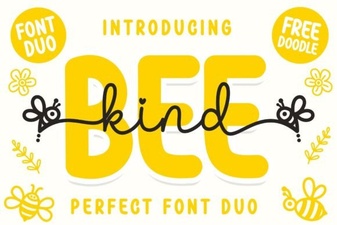 Bee Kind Duo Font: Perfect Pair for Creative Projects
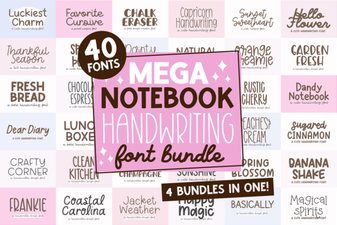 Digital Notebook Fonts for Handwriting & Creative Projects
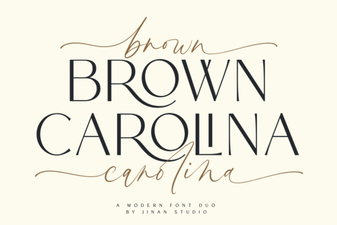 Brown Carolina Duo Font Design & Project Ideas
 Fonts to Brighten Your Digital Projects
 Handwritten Font Bundle for Creative Projects
 Palm Bay Font for Creative Social Projects